Channel triggers
Voice, SMS, form, inbox, or portal events that begin a leasing, resident, owner, or vendor workflow.
AI front desk
EMC2Ops builds an AI property management answering service around your phone system and operating rules. The AI front desk answers approved questions, collects caller details, and routes leasing inquiries, resident requests, and follow-up tasks to the right staff member.
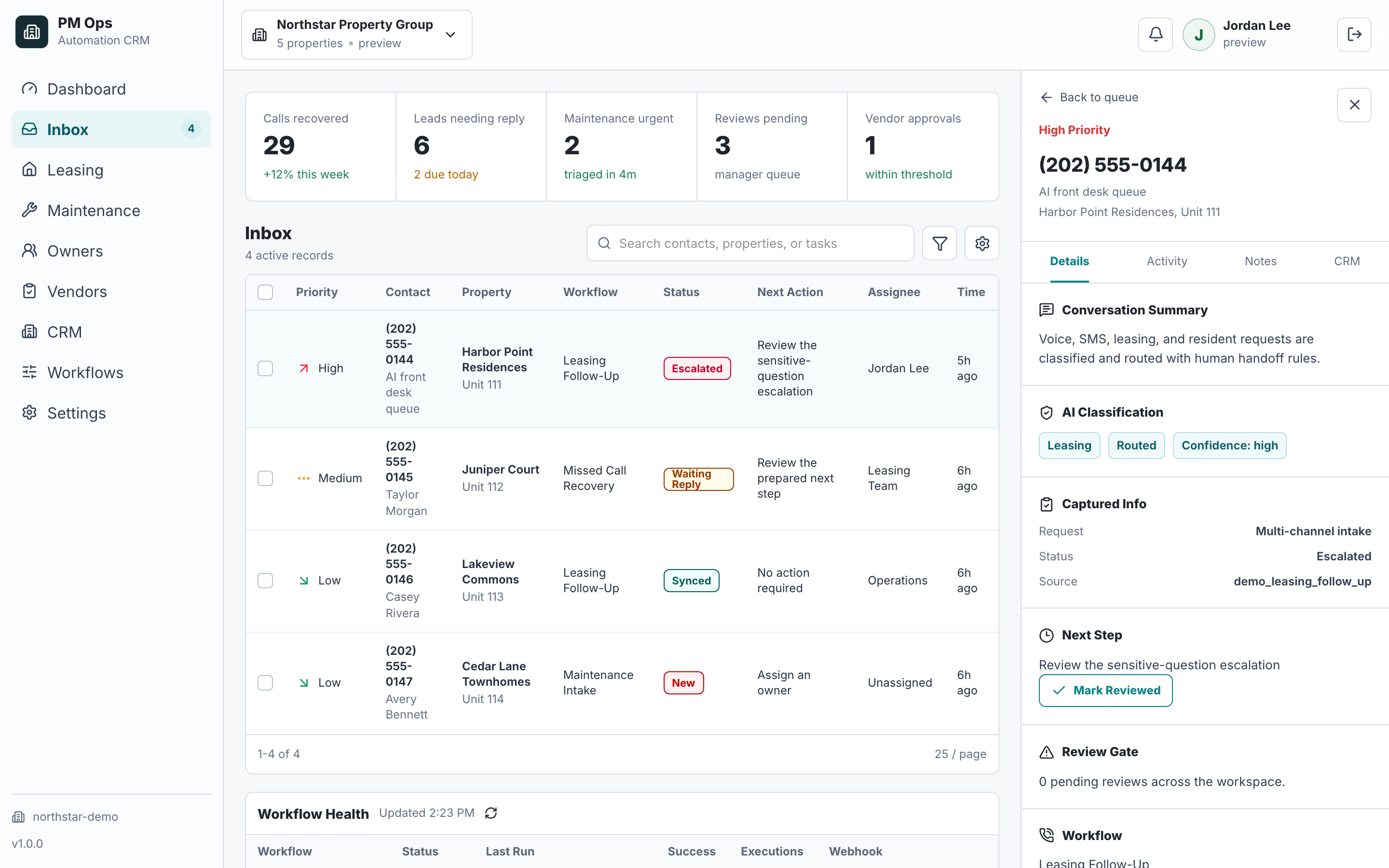
We scope the calls to answer, coverage hours, approved information, transfer destinations, and records to update. Your proposal defines the voice provider, usage costs, integration access, monitoring, and the staff fallback when an automated path cannot finish.
Respond faster across leasing, tenant, owner, and vendor workflows.
Collect the right context before staff step in.
Keep CRM records, tasks, and alerts current without manual retyping.
Audit deliverables
Each install is scoped around concrete triggers, captured fields, automations, writebacks, stop rules, and escalation paths.
Voice, SMS, form, inbox, or portal events that begin a leasing, resident, owner, or vendor workflow.
Caller identity, property, intent, urgency, contact details, prior status, and the next step staff need.
Triage, routing, scheduling prompts, intake questions, reminders, and status updates built around your operating rules.
Summaries, tasks, notes, stage updates, and alerts routed to the CRM or system of record.
Hand-off guards for staff takeover, opt-outs, sensitive questions, emergencies, and unclear answers.
Human review for fair-housing-sensitive questions, complaints, emergencies, owner issues, payments, and approval decisions.
Operator brief
The existing PM Ops screenshot demonstrates fictional workflow data. For your implementation, each enabled channel must produce an identifiable event, a usable record, and an accountable next owner.
A fictional Cedar Court caller asks about a two-bedroom tour. Capture the call ID, received time, source/property, confirmed contact, requested move date, unit preference, and next question. Recording or transcription is separately scoped; metadata and staff dispositions can also support the record.
The leasing queue receives the summary, current stage, requested action, and source record. A maintenance report moves to the documented maintenance route; emergencies, sensitive questions, and approvals reach the designated staff path. For a resident reporting water on the floor, collect the unit and concise facts, activate the documented escalation rule, and avoid improvised safety instructions.
An approved follow-up text uses the confirmed contact and current permission state. Store provider acceptance, delivery, reply, and saved CRM activity separately. A booked tour needs a confirmed calendar event; a failed write leaves a visible review task. An owner asking about a delayed repair reaches the portfolio manager with the work order, last vendor update, pending approval, and promised response time.
Human boundary: People retain screening, accommodations, emergency assessment, financial decisions, and policy exceptions. Staff takeover stops conflicting messages across the enabled channels.
Workflow audit
We will help pick the first measurable front-desk workflow and define the controls needed before expanding across channels.
Operational change
Qualification
Yes, when your phone provider and agreed configuration support after-hours routing. We define which leasing questions the AI may answer, where resident requests go, and who receives escalations. Coverage depends on the configured services and a reachable staff fallback; we do not provide a staffed call center.
Bring the property numbers, call types, coverage schedule, approved answers, tour-booking process, and staff escalation contacts. We test ordinary calls, missing information, unanswered transfers, duplicate events, and failed record updates before the agreed launch.
We first check your provider’s forwarding and integration options. An AI front desk can handle defined intake steps or pass summaries to your current team or answering provider when supported. Keeping a number, transferring calls, and connecting records must be verified for your setup.
EMC2Ops scopes implementation, testing, and maintenance for your workflow. Voice minutes, phone numbers, messaging, and other provider charges depend on the chosen services and usage. The written proposal separates those costs and defines the included work.
No. EMC2Ops installs operating workflows across voice, SMS, routing, CRM updates, and reporting.
Most teams should start with missed-call recovery, leasing follow-up, maintenance intake, or CRM logging because those are easy to measure.
Next step
Bring your process and software. In a 15-minute consultation, we’ll outline the build, required access, approvals, and next steps.
Hi — I’m the EMC2Ops assistant. I can answer questions, discuss the workflow you want to automate, or get a consultation on the calendar.
What brings you here?