Request triggers
Inbox, form, SMS, resident portal, or phone events that begin intake without forcing staff to retype the request.
Maintenance intake
EMC2Ops installs maintenance intake workflows that gather the issue, urgency, access notes, supported photos or video, and resident availability before routing a usable work-order record.
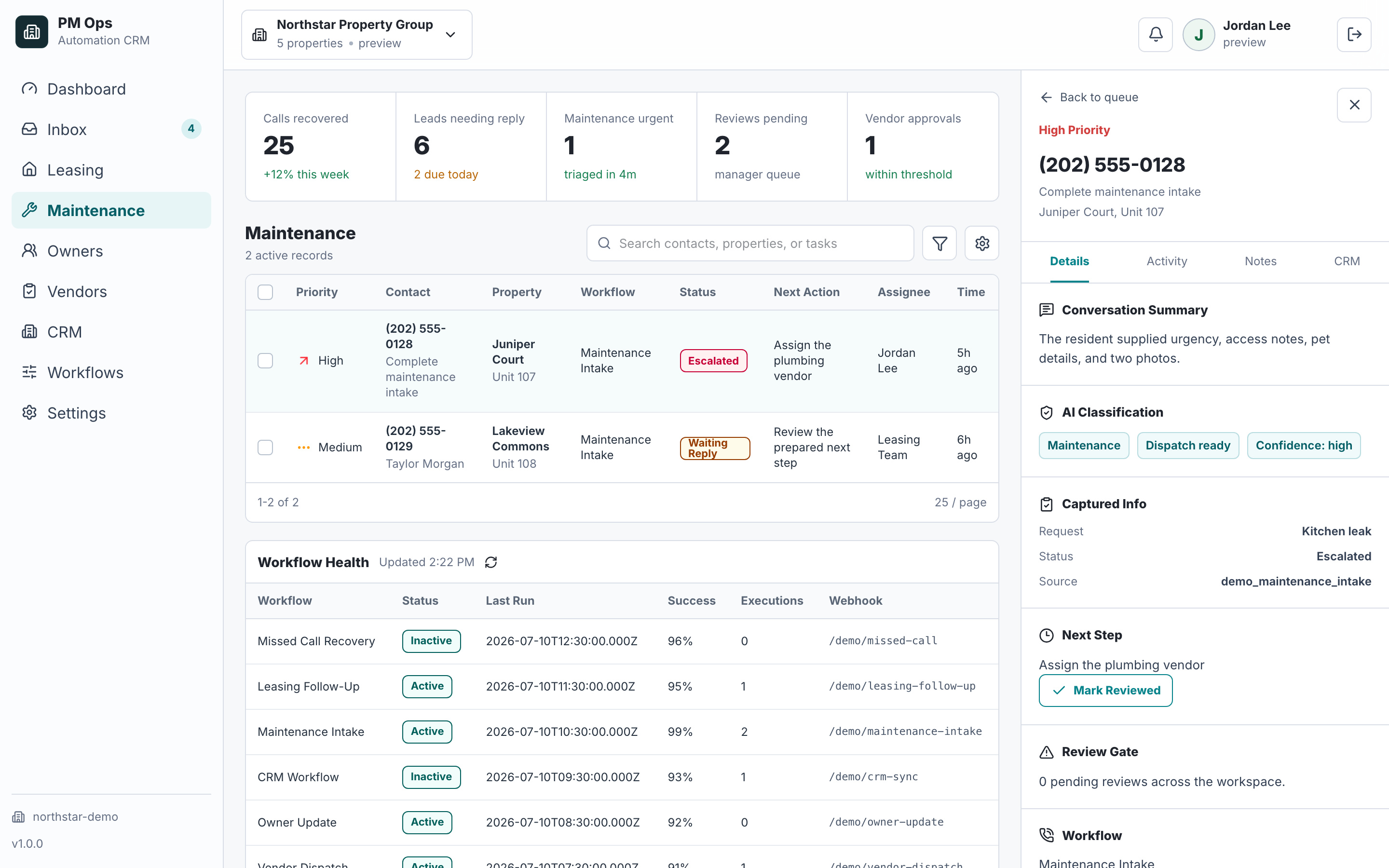
We review request channels, required work-order details, emergency indicators, access notes, photo handling, vendor routing, and approval rules.
Capture issue type, exact location, urgency, access notes, resident availability, and supported photos or video.
Separate emergencies from standard maintenance requests.
Route dispatch-ready summaries to coordinators, approved vendors, owner-approval queues, or the work-order system.
Acknowledge the resident and record the expected next update after routing.
Audit deliverables
Each install is scoped around concrete triggers, captured fields, automations, writebacks, stop rules, and escalation paths.
Inbox, form, SMS, resident portal, or phone events that begin intake without forcing staff to retype the request.
Issue type, exact location, urgency, access notes, resident availability, supported photos or video, pets, and prior attempts.
Follow-up prompts that gather missing details and create a readable maintenance summary.
Summary, category, urgency, property, media links, access context, and next step routed to the work-order tool, coordinator, or approved vendor path.
Automation stops when the request is complete, staff take over, a resident opts out, or an emergency path activates.
Emergency terms, habitability concerns, repeat issues, approval thresholds, and unclear resident answers route to staff.
Operator brief
A resident message that says “the sink is leaking” is not yet a usable work order. The coordinator still needs the exact fixture, when the leak started, whether water is actively spreading, access permission, pets, prior repair history, and evidence the vendor can review before accepting the job.
The workflow checks the unit and property, asks for the indoor temperature and symptoms, compares the answer with the approved emergency policy, and routes the request to the on-call path or the next-business-day queue. It does not invent an emergency classification.
A clear image can separate a dripping supply line from water around an appliance, but staff still control the diagnosis and dispatch rule. The useful automation step is attaching the right media to the right record so the coordinator and vendor see the same evidence.
“Anytime Tuesday” is incomplete when a resident has a dog, requires a call before entry, or has not granted permission. A good intake path records those constraints before scheduling so the handoff does not create another round of calls.
Human boundary: Maintenance automation should gather facts, apply documented routing rules, and make ownership visible. Staff retain control over emergency decisions, habitability questions, repair approval, vendor choice, resident disputes, and any request where the evidence conflicts.
Integration paths
The final connection depends on account permissions, supported APIs, fields, webhooks, and the safest available fallback. EMC2Ops verifies the path before promising an automated writeback.
Starts the request and collects the approved fields, access notes, and media the selected channel supports.
Scope work-order, note, task, or review handoffs after confirming the account's supported access path.
Route structured maintenance context through verified API, middleware, inbox, form, or staff-review paths.
Create the dispatch-ready record, preserve media links, and return acceptance, delay, or completion status.
Keeps cost, policy, warranty, and high-risk decisions with the approved human reviewer.
Connect events and writebacks through supported APIs, webhooks, Zapier, Make, n8n, or custom logic.
Workflow audit
We will map the first intake workflow that can collect missing details, identify exceptions, and route a usable summary.
Operational change
Measurement and proof
The baseline and post-launch window use the same required-field rules. Emergencies, duplicates, tests, unsupported media, and staff-takeover cases remain visible instead of being treated as successful automation.
The share of eligible requests containing every required field before staff must ask for missing information.
Proof records: Required-field specification, intake record, missing-field flags, and final work-order record.The share of eligible requests that attach the requested supported media to the correct work-order or secure record.
Proof records: Media request, upload or secure-link event, request identifier, and destination attachment record.Elapsed time from a complete request or detected exception to acceptance by the correct staff, vendor, approval, or work-order destination.
Proof records: Completion or exception timestamp, workflow log, destination acceptance, and retry or failure record.The share of eligible workflow runs requiring human review for emergencies, approvals, unclear identity, missing data, or integration failure.
Proof records: Workflow run, exception reason, human-review queue, and resolution state.PM Ops screenshots on this site use fictional workflow data. EMC2Ops currently publishes two five-star reviews from general automation projects, not property-management outcome claims. A property-management customer story will publish only after its baseline, source records, measurement window, metric definitions, limitations, quotation, and client approval are verified.
Qualification
Connect the approved resident channel to a structured intake that verifies the property and unit, checks emergency indicators, collects issue details and supported media, applies approval and routing rules, creates or updates the work order, and records who owns the next update.
It can identify emergency indicators and escalate, but final emergency handling rules should match your operating policy.
Yes, when the selected messaging channel and maintenance system support media. The implementation defines file limits, retention, access controls, and how each photo or link attaches to the work order.
Only for categories, properties, vendors, and approval thresholds your team defines. Emergencies, high-cost work, unclear access, duplicate requests, and other exceptions route to staff.
Next step
Bring your process and software. In a 15-minute consultation, we’ll outline the build, required access, approvals, and next steps.
Hi — I’m the EMC2Ops assistant. I can answer questions, discuss the workflow you want to automate, or get a consultation on the calendar.
What brings you here?